CAD Fasteners Database & Setup

ASME & ISO SOLIDWORKS Thread Profile Libraries

Select a standard category below (ASME American National or ISO Metric) to explore specialized thread profile library sheets (.SLDLFP) for SolidWorks.

30,686 Pre-Configured CAD Thread Profiles Available

Comprehensive thread configuration database indexed for SOLIDWORKS library feature parts (.SLDLFP) – including ACME trapezoidal and Stub ACME profiles.

ISO Metric: 27,864 Configs
ASME Unified: 2,812 Configs
ACME B1.5 + B1.8: 10 Files
Grand Total: 30,686
SOLIDWORKS 2026 CompatibleThese downloadable .SLDLFP library files are currently verified and compatible with SOLIDWORKS 2026. Backwards-compatibility for SOLIDWORKS 2020 and above (2020–2025) is actively in progress and will be released soon.
ASME / ANSI Standards (2,812 Configs)

ASME Thread Standards Card

Contains American National Unified Inch thread standards and power transmission profiles.

Sub-Standards Contained in this Card:
Unified Inch Screws (ASME B1.1)
2,812 Configs Active
ACME Threads (ASME B1.5)
4 Files Active ✓
Stub ACME Threads (ASME B1.8)
6 Files Active ✓
ASME UN / UNC / UNF / UNEF (Active)ACME Gen Purpose B1.5 (Active)ACME Centralizing B1.5 (Active)Stub ACME Std B1.8 (Active)Stub ACME Form 1 B1.8 (Active)Stub ACME Form 2 B1.8 (Active)UNJ (Soon)UNR (Soon)UNS (Soon)
Click to explore ASME sub-standards B1.1 + B1.5 + B1.8
ISO International Standards (27,864 Configs)

ISO Thread Standards Card

International Organization for Standardization Metric thread profiles (Metric V) and tolerance class libraries.

Sub-Standards Contained in this Card:
ISO Metric V Thread Profiles
27,864 Configs Active
ISO Metric External (21,672)ISO Metric Internal (5,418)ISO Basic External (387)ISO Basic Internal (387)
Click to explore ISO Metric V files 27,864 Configs

⚙️ SOLIDWORKS Thread Profile Installation Guide

Learn how to import thread libraries into SolidWorks easily.

Step 1: Open SolidWorks

Open SolidWorks, then click the Settings (Gear) icon in the top toolbar.
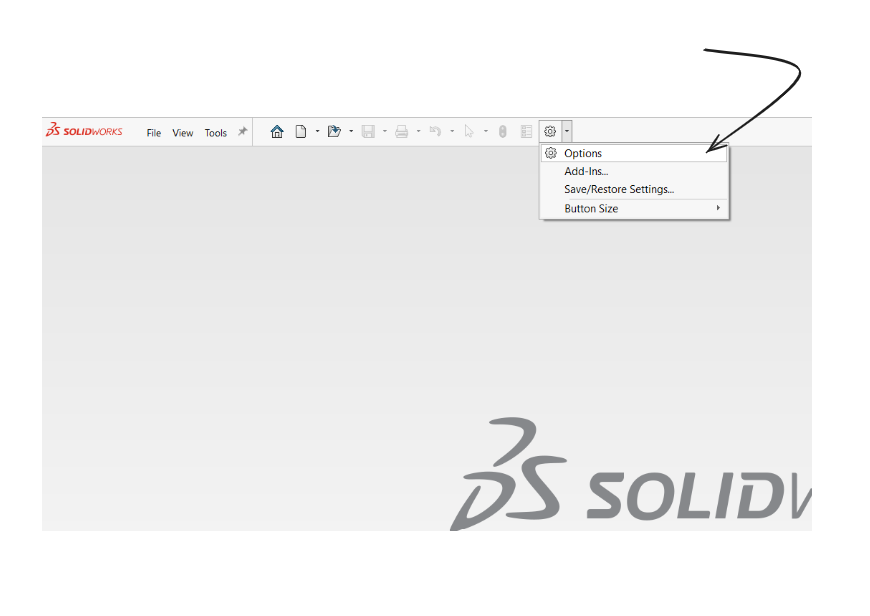
Step 1: Open SolidWorks

Community Feedback & Thread Profile Requests

Leave a comment or request new thread profile standards below. All submitted messages are visible to everyone on this board live.

0 Public Messages

Post a Public Message or Request🔒 Sign in required to post

You must be signed in to post comments, upvote, or reply to messages.

Public Message Display Board (0)

Technical Documentation & Setup Manual

SOLIDWORKS .SLDLFP Thread Profiles Library (30,676 Configurations)

Official deployment guide for custom Library Feature Parts (.SLDLFP), standard tolerance classes, and geometric helix modeling in SOLIDWORKS.

1. How to Link Custom .SLDLFP Thread Profiles in SOLIDWORKS

SOLIDWORKS utilizes Library Feature Part files (.SLDLFP) to define the cross-sectional cutting profile swept along a cylindrical helix when you execute the Insert > Features > Thread command. Follow these 5 steps to permanently configure your library:

Step 1:Download the desired standard profile pack (.SLDLFP) using the interactive downloader above (available for ASME Unified UNC/UNF/UNEF and ISO Metric).
Step 2:Move or extract the downloaded folder to a permanent CAD assets directory on your machine (e.g., C:\SolidWorks_Custom_Profiles\Thread Profiles\).
Step 3:Open SOLIDWORKS and navigate to Tools > Options > System Options > File Locations.
Step 4:In the Show folders for dropdown list, select Thread Profiles.
Step 5:Click Add, browse to your custom profile folder, click Select Folder, and press OK. Your custom profiles will immediately appear in the Thread Feature PropertyManager.
SOLIDWORKS Version Compatibility Note: These .SLDLFP profile files are currently verified and compatible with SOLIDWORKS 2026. Backwards-compatible versions for SOLIDWORKS 2020 and above (2020, 2021, 2022, 2023, 2024, 2025) are actively in engineering development and will be unlocked in the version selector once finalized.

2. Critical Sizing Requirement: Matching Pre-Machining Stock Diameters

Because the SOLIDWORKS Thread tool sweeps the profile along the exact cylindrical boundary of your 3D model, thread pitch accuracy and fit tolerance are only guaranteed when the base cylinder or hole diameter matches the official standard limits:

External Threads (Bolts, Studs, Screws)

The starting cylindrical shaft must be turned to the standard Major Diameter (d). The .SLDLFP profile cuts inwards to form the root and flanks. Verify major diameter tolerances on our ISO Metric External Calculator.

Internal Threads (Nuts, Tapped Holes)

The starting hole must be bored or drilled to the standard Minor Core Diameter (D1). The profile cuts outwards to generate the pitch and major diameters. Verify tap drill limits on our ASME Unified Calculator.

3. Standards Coverage Breakdown (30,676 Configurations)

Our database encompasses the complete mathematical range of standard pitch and tolerance class combinations:

Standard SeriesConfigurationsTolerance ClassesNominal Size Range
ISO Metric (ISO 261 / 965)27,864 profiles4h, 6g, 6e, 8g / 4H, 5H, 6H, 7HM1 × 0.2 mm to M100+ coarse & fine
ASME Unified (ASME B1.1)2,812 profilesClass 1A/1B, 2A/2B, 3A/3B#0-80 to 2"+ UNC, UNF, UNEF, UN
SOLIDWORKS Version Compatibility2026 (Active)2020 – 2025 (In Development)Native Library Feature Part format (.SLDLFP)

4. When to Use Modeled Helices vs. Cosmetic Threads

While cosmetic thread callouts are appropriate for drafting drawings and large assemblies to conserve RAM, physically modeled 3D threads are mandatory in three key engineering scenarios:

  • Additive Manufacturing (3D Printing): Slicers (Cura, PrusaSlicer, Bambu Studio) require physical solid facets to lay down helical toolpaths. Modeled threads allow directly functional prints that thread cleanly without manual post-tapping.
  • Finite Element Analysis (FEA): High notch stress concentration factors at the thread root fillet cannot be evaluated using cosmetic textures. True swept profiles enable realistic Von Mises stress simulations under tensile and shear preloads.
  • Multi-Axis CAM & Thread Milling: Single-point and helical thread milling toolpaths in CAM software (Mastercam, SolidCAM, HSMWorks) require actual 3D helical path geometry.

Frequently Asked Questions (.SLDLFP Profiles)

How do I install custom .SLDLFP thread profiles in SOLIDWORKS?

To install custom .SLDLFP thread profiles: 1) Download the profile pack (.SLDLFP) from our library. 2) Unzip the files into a permanent folder (e.g., C:\SolidWorks_Thread_Profiles\). 3) In SOLIDWORKS, go to Tools > Options > System Options > File Locations. 4) Select "Thread Profiles" from the dropdown. 5) Click "Add", navigate to your folder, and click OK. The Thread Feature tool will immediately populate the new standards.

Why does SOLIDWORKS show an error or incorrect thread profile?

The SOLIDWORKS Thread Feature requires the starting cylinder diameter (for external threads) or core hole diameter (for internal threads) to match the official nominal standard limits. If the base cylinder diameter deviates from the standard major or minor diameter, the swept thread profile will either fail or self-intersect. Use our ISO and ASME thread calculators to verify your pre-machining stock diameters.

What is the difference between Internal and External .SLDLFP thread profiles?

Internal thread profiles (.SLDLFP) cut material inward from a drilled tap hole to form standard internal nut threads conforming to tolerance classes like 6H or 2B. External thread profiles cut material from the outside of a cylindrical bolt shank to create screw threads matching tolerance classes like 6g or 2A.

Which SOLIDWORKS versions are currently compatible with these .SLDLFP files?

These .SLDLFP custom thread profile files are currently verified and compatible with SOLIDWORKS 2026. Backwards-compatible releases for SOLIDWORKS 2020, 2021, 2022, 2023, 2024, and 2025 are actively in engineering development and will be available soon.

Can these thread profiles be used for 3D printing and CNC CAM thread milling?

Yes. Because our .SLDLFP profiles model true mathematical 3D helical sweeps with standard crest truncations and root clearances, exported STL, 3MF, and STEP models are 100% physically functional for additive manufacturing and multi-axis CNC thread milling.